
Overview #
Audit types help your organisation classify asset audits according to their purpose and operating requirements. Selecting the appropriate audit type ensures that users understand why an audit is being conducted and how its results should be reviewed.
The audit types available to you depend on how AssetIQ has been configured for your organisation.
What is an audit type? #
An audit type identifies the purpose or method of an asset audit. It provides a consistent way to group similar audits and distinguish between different verification activities.
For example, your organisation may configure audit types for:
- Scheduled asset verification
- Location-based audits
- Department or business-unit audits
- Category-specific audits
- Spot checks
- Compliance or internal-control reviews
- Year-end asset verification
These are examples only. The names and definitions shown in your AssetIQ environment may be different.
Why are audit types important? #
Using clearly defined audit types helps your organisation:
- Apply a consistent audit process
- Communicate the purpose of each audit
- Organise audits for reporting and review
- Distinguish scheduled audits from unplanned checks
- Apply appropriate internal procedures
- Analyse audit results by purpose or audit method
- Maintain a clearer audit history
An audit type should describe the reason for the audit. The audit’s asset selection and other details determine its actual scope.
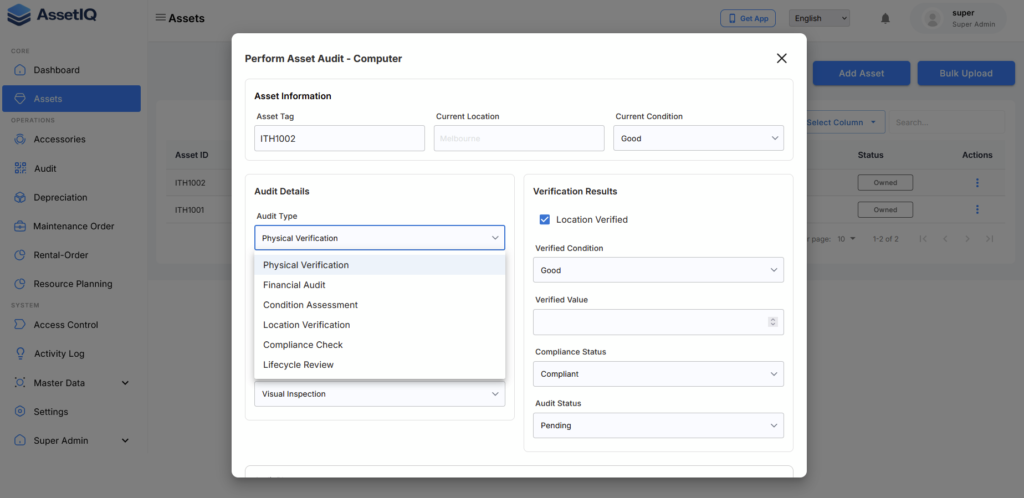
Common ways to classify asset audits #
Your organisation can establish audit types that reflect its operational requirements. Common classifications include the following.
Scheduled audit #
A scheduled audit is conducted as part of a planned audit programme. It may occur monthly, quarterly, annually or according to another internal schedule.
Scheduled audits can help organisations maintain accurate asset information over time.
Location audit #
A location audit focuses on assets expected to be held at a particular site, office, warehouse, facility or project location.
This type of audit can help confirm whether:
- Assets are physically present at the recorded location
- Assets have been transferred without an update
- Location information remains accurate
- Unexpected assets are present at the location
Business-unit audit #
A business-unit audit reviews assets associated with a selected business unit, department, legal entity or operational team.
It can support internal accountability and help managers confirm the assets associated with their area of responsibility.
Asset-category audit #
A category audit focuses on a particular group of assets, such as vehicles, machinery, tools, IT equipment or office equipment.
It is useful when different asset categories require different verification schedules or control procedures.
Spot check #
A spot check is a limited audit of a selected group of assets. It may be performed without following the organisation’s full scheduled audit cycle.
Spot checks can help identify potential record-quality problems and determine whether a broader audit is required.
Compliance audit #
A compliance audit is performed to support an internal policy, regulatory requirement, certification process or external review.
The organisation should define the required scope, evidence and approval process before starting this type of audit.
Note: These are common examples, not a fixed list of AssetIQ system options. Always select from the audit types configured in your organisation’s AssetIQ environment.
How to select the correct audit type #
Before selecting an audit type, consider the following questions:
- Why is the audit being conducted?
- Which assets need to be verified?
- Is the audit part of a scheduled programme?
- Is it limited to a location, business unit or asset category?
- Are there any compliance or reporting requirements?
- Who will review the completed results?
- Does an existing audit type already meet the requirement?
Choose the audit type that most accurately represents the main purpose of the audit.
If no suitable option is available, contact your AssetIQ administrator before creating the audit. Avoid selecting an unrelated type only to continue the process, as this can affect reporting and audit history.
Audit type versus audit scope #
Audit type and audit scope have different purposes:
| Item | What it defines | Example |
|---|---|---|
| Audit type | Why or how the audit is being conducted | Scheduled audit |
| Audit scope | Which assets will be audited | Assets at the Melbourne warehouse |
| Assignment | Who is responsible for conducting it | Warehouse manager |
| Schedule | When the audit should be completed | 30 September |
For example, you might create a Scheduled Audit with a scope covering all assets assigned to a particular location.
Before creating a new audit type #
If you are authorised to manage audit types, check whether an appropriate type already exists before adding another one.
When defining an audit type:
- Use a short and meaningful name
- Make its purpose clear to users
- Avoid creating duplicate or overlapping types
- Follow your organisation’s naming standards
- Document when the audit type should be used
- Confirm whether it is required for reporting
A consistent list is easier for users to understand and produces more reliable reporting.
If an audit type is unavailable #
If you cannot find the required audit type:
- Confirm that you are using the correct AssetIQ organisation
- Review the full list of available audit types
- Check whether the type uses a different name
- Contact your AssetIQ administrator
- Confirm whether the audit type is active and available for use
Your access to audit configuration may depend on your assigned role and permissions.
Next steps #
After identifying the appropriate audit type, continue with these guides:
- Create and Assign an Asset Audit
- Conduct and Submit an Asset Audit
- Review Audit Discrepancies
- Export Asset Audit Results
For a general explanation of asset audits, see Introduction to Asset Audits.


